Mrrrr's Forum (VIEW ONLY)
Un forum care ofera solutii pentru unele probleme legate in general de PC. Pe langa solutii, aici puteti gasi si alte lucruri interesante // A forum that offers solutions to some PC related issues. Besides these, here you can find more interesting stuff.
|
Lista Forumurilor Pe Tematici
|
Mrrrr's Forum (VIEW ONLY) | Reguli | Inregistrare | Login
POZE MRRRR'S FORUM (VIEW ONLY)
Nu sunteti logat.
|
Nou pe simpatie:
Profil angela31
 | Femeie
23 ani
Buzau
cauta Barbat
24 - 60 ani |
|
Mrrrr
AdMiN
 Inregistrat: acum 19 ani
Postari: 2386
|
|
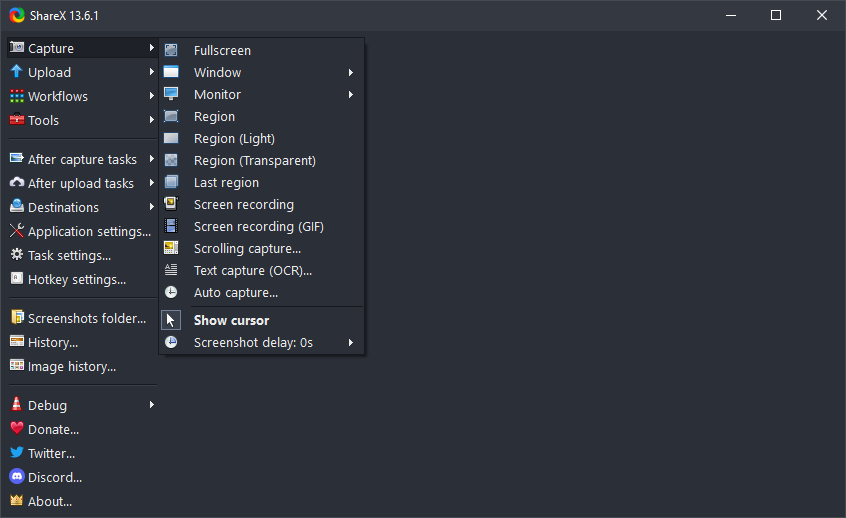
ShareX is a free and open source screenshot tool for Windows with screen capture, screen recording, file sharing and productivity features built into one lightweight application.
• Completely free
• Open source
• No advertisements
• Lightweight
• Privacy first
• Over 18 years of active development
• Trusted by large companies
• Built for power users
• Quick screenshot sharing
• Easy GIF recording
• Supports a wide range of destinations
• Advanced custom uploader support
• Customizable workflow system
More info:
Setup & Portable:
_______________________________________

|
|
| pus acum 8 ani |
|
Mrrrr
AdMiN
Inregistrat: acum 19 ani
Postari: 2386
|
|
Latest update - ShareX 21.0.0 - 2026-07-03 - has lots of changes:
• Added "Background remover" tool. ShareX
• Added "Image Comparer" tool. ShareX
• All 23 languages are 100% translated, except for the Avalonia UI windows, which are not localizable yet.
• Image editor improvements:
o Added a "Customize toolbar" button to the Options dialog. It lets you fully customize the toolbar, including showing or hiding specific tools, reordering them, and changing their hotkeys. ShareX
o Added "Pick color from screen" button to color picker.
o Added image editor notifications.
o Added "Show notifications" option.
o Added "K Cursor" annotation tool.
o Added "Blur amount" option for Spotlight tool.
o Double clicking on emoji now opens the Emoji Picker dialog.
o Double clicking on image now opens the File Picker dialog.
o Added "Ctrl + H Hide/Show toolbars" button to context menu. ShareX
o Added "Step type" option for Step tool, with this options:
1, 2, 3
A, B, C
a, b, c
I, II, III
i, ii, iii
o Added "Horizontal alignment" option to Text & Speech Balloon annotation tools, with this options:
Left
Center
Right
o Added "Toggle bold" option to Speech Balloon & Step annotation tools.
o Added "Toggle italic" option to Speech Balloon annotation tool.
o Added "Toggle tail" option for Speech Balloon & Step annotation tools.
o On exit confirmation dialog "Yes" button is automatically focused now.
o Added "Border style" option to Rectangle, Ellipse, Line, Freehand annotation tools, these are the options:
Solid
Dash
Dot
Dash Dot
Dash Dot Dot
o Added rotation support to these annotation tools:
Rectangle
Ellipse ShareX
Speech Balloon
Highlight
Blur
Pixelate
Magnify
o Holding Ctrl now disables shape selection, allowing you to draw a shape on top of another shape.
o Holding Ctrl while creating a shape now allows you to move it.
o Added a "Favorite Image Effects" action when right clicking the Image Effects button.
o Added "Toggle ellipse shape" option to Magnify & Spotlight tools.
o In the Background tool, gradient colors can now be edited using the color picker.
o Added “Shadow options” menu, when right clicking the "Toggle shadow" button, these are the options:
Color
Blur
Opacity
Offset X
Offset Y
o Added easter egg. ShareX
• Ignore NVIDIA GeForce Overlay in region capture selection.
_______________________________________
|
|
| pus acum 1 luna |
|